Settings screen
The settings screen lets you change device options and view device information.
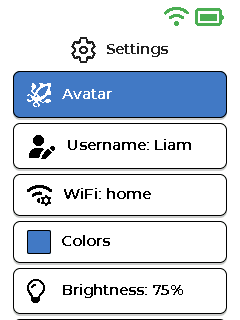
Settings screen with device options.
Below it is a list of settings. Use the up and down buttons to move through the list. Press OK to select an item. Press Back to return to the menu.
Options on the screen
- Avatar - Choose the icon used for the child profile. The default avatar is . This avatar is what friends see as your icon in their friend list. New avatars can be unlocked by winning badges.
- Username - Shows the current username. The username can be changed only once every 7 days.
- WiFi - Shows the connected Wi-Fi network, or shows WiFi: not connected. Select it to choose a Wi-Fi network.
- Colors - Change the screen color theme.
- Brightness - Change the screen brightness. The current level is shown as a percentage.
- Language - Change the language used on Talkid.
- Informations - Opens the information screen.
Helpful tips
Tip
If calls or messages do not work, check WiFi first.